Application Menus
core.menu_view is the application's core.menuview instance. It owns the
menu bar and a registry of plugin contributions; its dropdowns and nested
submenus are core.contextmenu floating views. Use this existing instance to
extend the application menu rather than constructing another MenuView or
modifying its internal items array.
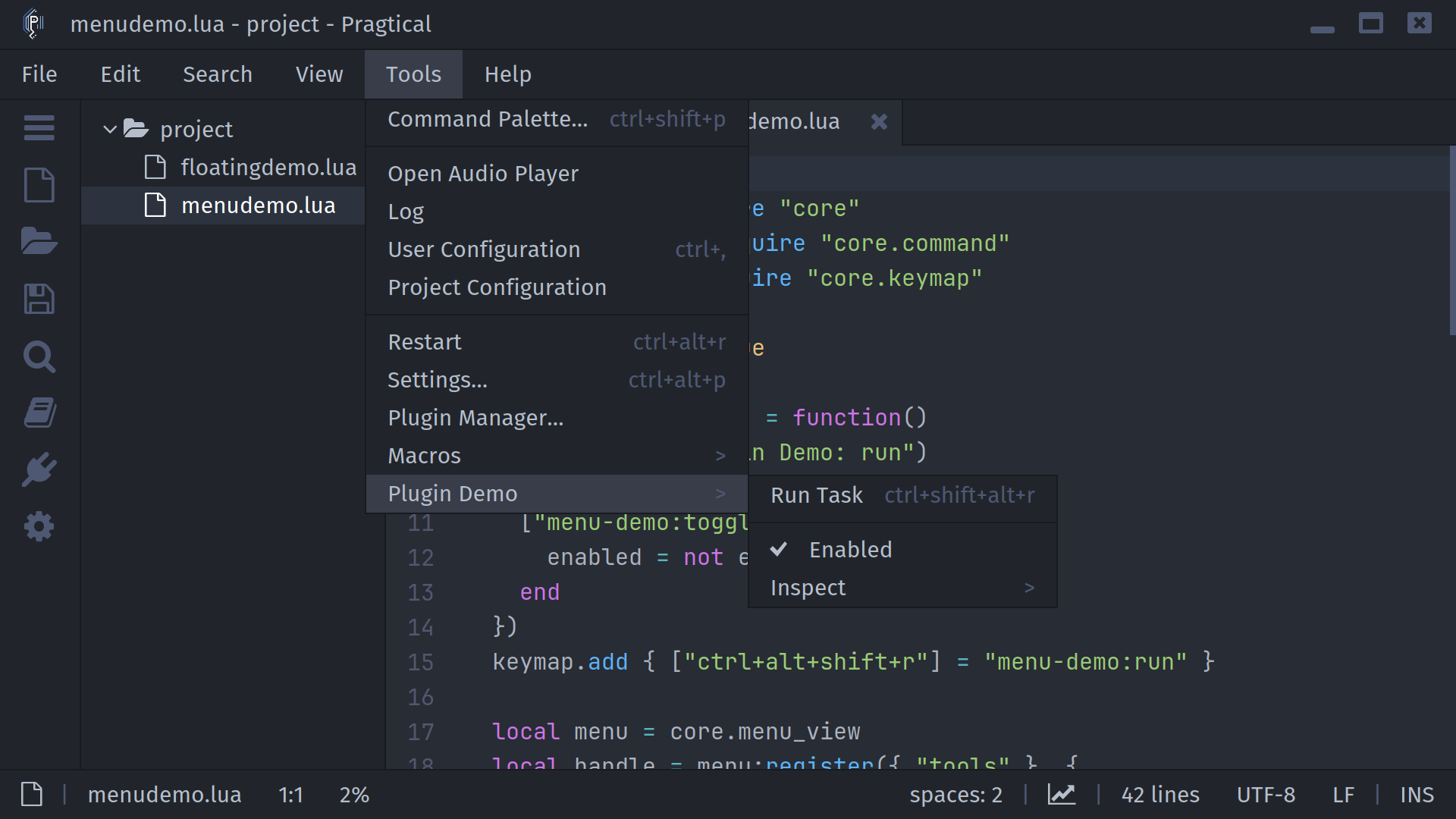
For bar visibility, shortcuts, and navigation, see the Application Menus user guide. For popup placement and input policies, see Floating Views. Menu navigation preserves the originating document's focus, so its command predicates and selection remain available to your actions.
Register plugin actions
Save this complete example as menudemo.lua in your user plugins directory.
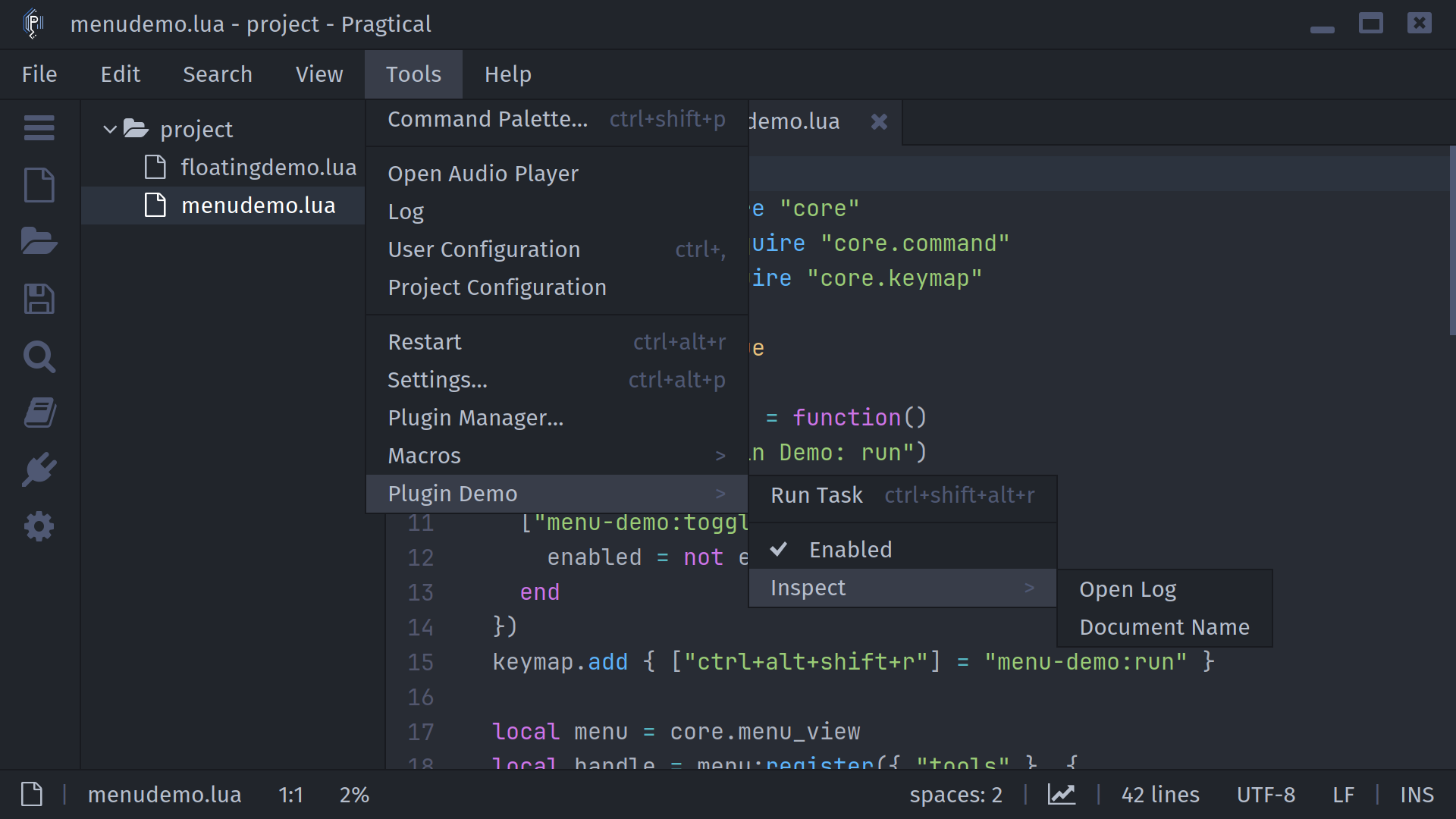
It adds Tools → Plugin Demo, with a command, a checked option, a separator,
and a nested submenu. Register commands before registering their menu entries.
-- mod-version:3
local core = require "core"
local command = require "core.command"
local keymap = require "core.keymap"

local enabled = true
command.add(nil, {
  ["menu-demo:run"] = function()
    core.log("Plugin Demo: run")
  end,
  ["menu-demo:toggle"] = function()
    enabled = not enabled
  end
})
keymap.add { ["ctrl+alt+shift+r"] = "menu-demo:run" }

local menu = core.menu_view
local handle = menu:register({ "tools" }, {
  menu:group("plugin-demo", "Plugin Demo", {
    menu:entry("run", "Run Task", "menu-demo:run"),
    menu.DIVIDER,
    menu:entry("enabled", "Enabled", "menu-demo:toggle",
      function() return enabled end),
    menu:group("inspect", "Inspect", {
      menu:entry("log", "Open Log", "core:open-log"),
      {
        id = "document",
        text = "Document Name",
        command = function()
          local doc = core.active_view.doc
          core.log("%s", doc and (doc.filename or "Untitled") or "No document")
        end
      }
    })
  })
}, "menu-demo")

return {
  unregister = function()
    menu:unregister(handle)
  end
}
group(id, text, items) and entry(id, text, command, checked) are helpers
that return ordinary entry tables; use table literals for additional fields.
The checkmark reflects the callback's value when the menu opens or the row is
visited. A direct function action has no command predicate or automatic binding;
use a named command when you need those integrations.
Paths and entry fields
Registration paths use stable IDs, independent of display labels.
{ "tools" } targets Tools, { "edit", "lines" } targets Edit → Lines,
and {} adds top-level entries. Every component must already identify a
submenu. Core top-level IDs are file, edit, search, view, tools,
and help.
| Field | Meaning |
|---|---|
id | Required nonempty string, unique among siblings. Prefix plugin IDs to avoid collisions. |
text | Required display label. |
command | Registered command name or function called without arguments. Cannot be combined with items. |
items | Array of child entries for a submenu. Cannot be combined with command. |
checked | Boolean or callback returning the current checked state. |
visible | Boolean or callback controlling whether the entry is included when opened. |
info | Right-aligned hint. A named command's current keyboard binding takes precedence. |
Use menu.DIVIDER between groups of actions; leading, trailing, and consecutive
separators are removed when building the popup. Availability comes from
core.command predicates, not an enabled entry field. Unavailable application
commands stay visible but disabled. Ordinary context menus filter them out.
Reloading and cleanup
The optional third argument to register(path, entries, name) names a
contribution. Registering the same name again replaces its previous entries,
preserving their position when the destination is unchanged. Use a distinct
name for each destination if a plugin contributes to multiple menus.
Validation happens before replacement, so invalid entries leave the old
contribution intact.
The returned handle identifies exactly those inserted entries.
menu:unregister(handle) removes them and is safe to repeat. The example
exports an unregister() function for your plugin's cleanup code to call;
this is not an automatic plugin-unload hook. Remove child contributions before
removing a parent group they depend on.
The application instance and menu commands exist before plugins load. Bundled
plugins register entries after their commands; a disabled plugin contributes
nothing. Independently distributed plugins targeting older editors can guard
registration with if core.menu_view then ... end.
Callback lifetime and context targets
Visibility, checked-state callbacks, bindings, and predicates are evaluated when a popup or submenu opens. Update and draw reuse that snapshot; they do not run callbacks every frame. Application-menu navigation refreshes the visited row's availability and checked state, and command dispatch rechecks its predicate. Top-level visibility is refreshed on registration changes or the next opening. Reopen the popup to pick up other visibility changes, and keep callbacks short.
For treeview context-menu extensions, use
require("plugins.treeview"):get_context_item() to retrieve the clicked item
during command dispatch. The application menu instead retains the originating
active view; it does not create a treeview right-click target.
Source reference
The implementation lives in the editor's data/core/menuview.lua and
data/core/contextmenu.lua. See the API page for
ContextMenu and the
Commands guide for command predicates.