Floating Views
A floating view appears over the editor without reserving layout space or
creating a tab. Any core.view subclass can use this mode, including document
views and widgets. RootView updates, draws, and routes input to shown floating
views separately from the docked node tree, in stacking order, with drawing
clipped to the editor window.
If you are new to editor UI development, start with Core UI Architecture and Views.
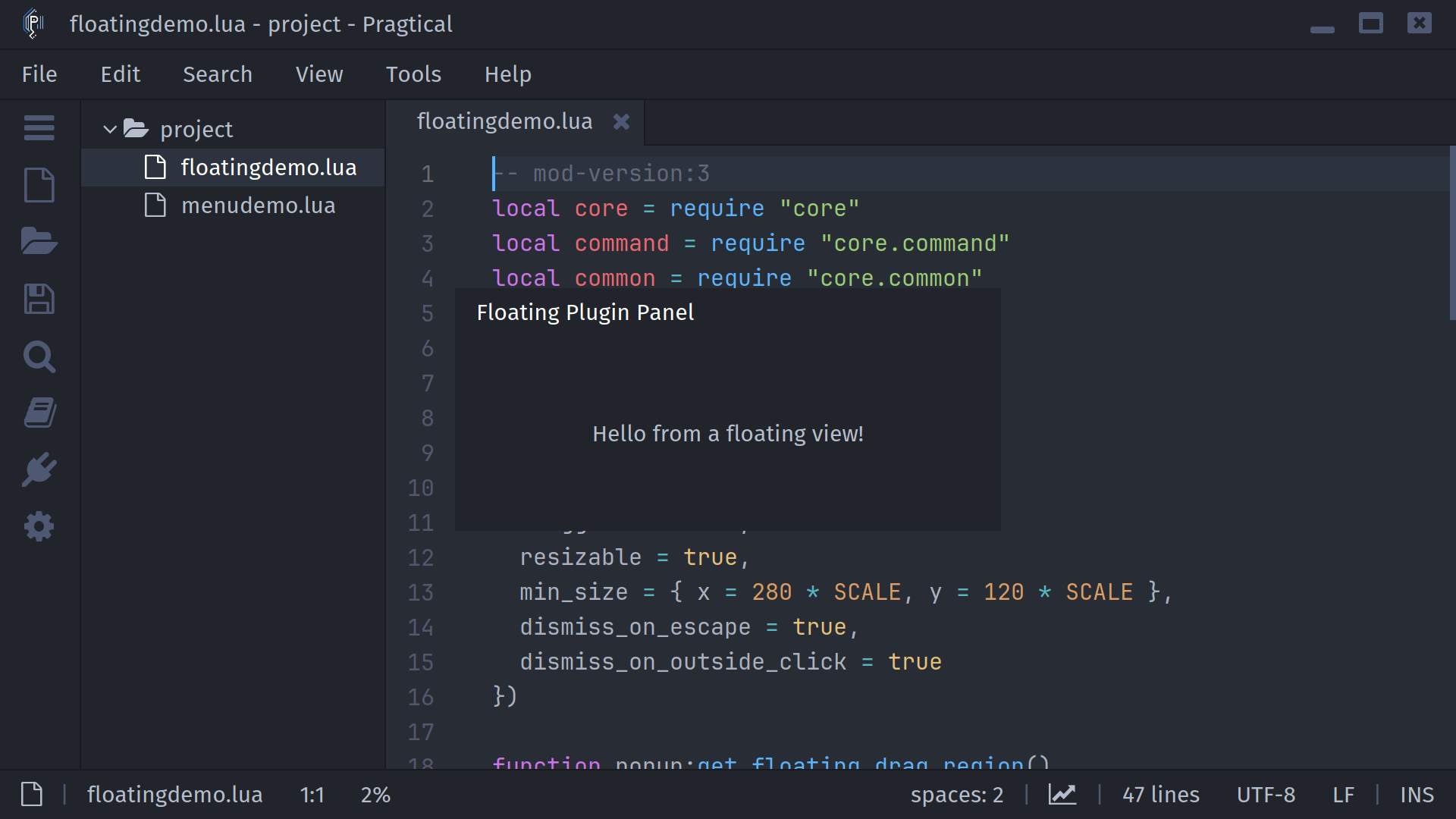
Create a popup
Save this as floatingdemo.lua in your user plugins directory. The
floating-demo:show command opens a draggable, resizable popup that keeps editor
focus and closes on Escape or an outside click. floating-demo:hide closes it
with a slide. Run the commands from the command palette.
-- mod-version:3
local core = require "core"
local command = require "core.command"
local common = require "core.common"
local style = require "core.style"
local View = require "core.view"

local popup = View()
popup:set_floating(true, {
  focus = "none",
  draggable = true,
  resizable = true,
  min_size = { x = 280 * SCALE, y = 120 * SCALE },
  dismiss_on_escape = true,
  dismiss_on_outside_click = true
})

function popup:get_floating_drag_region()
  local x, y, w = self:get_floating_bounds()
  return x, y, w, style.font:get_height() + style.padding.y * 2
end

function popup:draw()
  self:draw_background(style.background3)
  local x, y, w, h = self:get_floating_bounds()
  local header = style.font:get_height() + style.padding.y * 2
  renderer.draw_rect(x, y, w, header, style.background2)
  common.draw_text(style.font, style.accent, "Floating Plugin Panel",
    "left", x + style.padding.x, y, w - style.padding.x * 2, header)
  common.draw_text(style.font, style.text, "Hello from a floating view!",
    "center", x, y + header, w, h - header)
end

command.add(nil, {
  ["floating-demo:show"] = function()
    local root = core.root_view
    local w, h = 360 * SCALE, 160 * SCALE
    popup:set_floating_bounds(
      root.position.x + (root.size.x - w) / 2,
      root.position.y + (root.size.y - h) / 2, w, h
    )
    popup:show_floating { from = "top" }
  end,
  ["floating-demo:hide"] = function()
    popup:hide_floating { to = "top" }
  end
})
Drag the header to move the panel, or drag an edge or corner to resize it.
RootView handles these gestures: a resize starts before the content's press
handler, while a drag starts only if on_mouse_pressed does not consume the
press. Limit get_floating_drag_region() to a header so buttons or text inputs
in the body retain their normal behavior. Bounds and minimum sizes use screen
pixels; multiply logical dimensions by SCALE and recompute them when needed.
The example recenters on each show; an anchor is better for continuous tracking.
set_floating(true, options) enables the mode and merges options; it does not
show the view. show_floating(options) registers or raises it, enabling floating
mode with defaults if necessary. Repeated shows
do not duplicate registration. hide_floating(options) removes it, cancels
capture, closes owned popups, and restores focus when necessary.
set_floating(false) hides it and disables the mode, preserving settled bounds.
Configure placement and input with set_floating; show_floating and
hide_floating accept only animation options. Invalid option names, types,
or values raise an error before changing visibility, focus, or mouse capture.
RootView manages the registry automatically. Plugins normally use these View
methods rather than calling add_floating_view or remove_floating_view.
Common popup policies
These examples configure views that already draw their own contents. Set their bounds before showing, as in the example above.
A tooltip follows its owner and lets mouse input reach the editor underneath. Ownership controls lifetime; anchoring controls position. They are independent:
tooltip:set_floating(true, {
  owner = owner,
  interactive = false,
  focus = "none",
  anchor = { target = owner, side = "bottom", gap = 4 * SCALE }
})
tooltip:show_floating()
A notification can slide into view, remain visible briefly, then slide away:
local core = require "core"
notice:set_floating(true, { interactive = false, focus = "none" })
notice:show_floating { from = "right" }
core.add_thread(function()
  coroutine.yield(4)
  notice:hide_floating { to = "right" }
end)
An interactive popup takes keyboard focus and dismisses on Escape or an outside click. Hiding it restores the previous focus:
popup:set_floating(true, {
  owner = owner,
  focus = "show",
  dismiss_on_escape = true,
  dismiss_on_outside_click = true
})
popup:show_floating()
Text and IME composition go directly to core.active_view, including a focused
descendant of a floating container. A menu can set popup.capture_text_input = true
and return true from on_text_input to consume typing while preserving editor
focus. Passive overlays and closing popups do not capture typing or composition.
For editable views, use core.root_view:close_view(view) to honor try_close
and unsaved-changes prompts. hide_floating only changes visibility.
Placement and input options
set_floating option | Default | Meaning |
|---|---|---|
owner | unset | View that owns this popup. Hiding it, or switching away from its tab, hides the popup and its descendants. Set false to clear ownership. |
focus | "click" | "click" focuses on press, "show" focuses on show, "none" preserves current focus. |
interactive | true | Set false for a tooltip or visual overlay that should let input reach views underneath. |
modal | false | Blocks underlying pointer and floating-key routing; allows focus only within the popup or its direct owner. Outside pointer events go to the modal view. |
dismiss_on_escape | false | Escape invokes on_floating_dismiss("escape"). |
dismiss_on_outside_click | false | Outside clicks and window focus loss dismiss the popup. Its owner and owned submenus count as inside. |
dismiss_on_owner_click | false | Treat clicks on the owning view as outside. Context menus enable this and pass the click through; menubar popups keep their bar inside. |
outside_click_event | "press" | Use "release" for dropdowns opened by a press. |
consume_outside_click | true | Set false to let the dismissal click reach the underlying view. |
pass_through_unhandled | false | For an interactive overlay, pass unhandled pointer events to docked views. |
draggable | false | Allows dragging in get_floating_drag_region() when content does not consume the press. |
resizable | false | Allows resizing at edges and corners. |
min_size | {x=1, y=1} | Minimum dimensions during resizing, in pixels. |
anchor | unset | {target=..., side="bottom", align="start", gap=0}. Target can be a View, {x,y,w,h}, or a function returning that rectangle. Set false to clear it. |
Anchor sides are top, bottom, left, and right; alignment is start,
center, or end. Placement flips to the opposite side when necessary and
clamps to the editor viewport. Dragging clears the anchor.
show_floating accepts from, and hide_floating accepts to, with the same
four edge names. Both accept the existing animation rate, transition name
(default "floating"), and on_complete(view). Slides follow
config.transitions, config.disabled_transitions.floating, and the editor's
animation settings. A closing popup immediately stops receiving input; it
continues drawing until the slide finishes. Reopening cancels a pending close
and its completion callback. Fading is not implemented.
An explicit rate must be greater than zero and at most one.
Composites can override get_floating_bounds, set_floating_bounds,
get_focus_target, hit_test, and owns_view. Bounds include borders. Custom
keyboard handling uses on_key_pressed(stroke, ...), returning true to
consume the normalized binding before command dispatch. Hiding or losing
window focus calls on_mouse_capture_lost to cancel gestures without clicks.
RootView handles placement, input routing, and stacking. Floating views do not
need to override RootView or arrange their own deferred drawing. Keep normal
update() and draw() methods on the view; call their superclass methods when
using inherited scrolling or other View behavior. RootView calls
update_floating() before the view's regular update.
Call bring_to_front() to raise an already shown view and its owned popups
together. Input is routed from the top of the stack down; interactive = false
skips the overlay entirely. pass_through_unhandled forwards unconsumed press,
motion, or wheel events to docked views, rather than to another floating view.
Override on_floating_visibility_changed(visible) to synchronize a controller
when RootView removes its popup, including when its owner is hidden. Override
on_floating_dismiss(reason) to handle "escape", "outside", or "focuslost";
its default implementation hides the floating view. Keep dismissal separate
from closing an editable document, which should go through close_view.
Moving between docked and floating placement
Placement ownership is explicit. Remove a tab from its node, or a widget from its parent, before showing it as floating. Pragtical does not automatically save a node to restore later: removing the last tab can collapse that node. To attach it again, hide it, disable floating mode, then add it to the current target node or container. This API does not add a docking UI or persist floating placement in workspace sessions.
CommandView's bottom and top placements retain a docked input reservation and
use a floating companion for suggestions; centered placement floats the whole
palette. NagView retains its docked reservation and uses a floating companion
for modal drawing. Widgets, completion documentation, and context menus use the
same registry. The editor pins Widget to a matching commit through
subprojects/widget.wrap, so Widget uses these core APIs directly.
Built-in floating views
For palette placement and everyday navigation, see Command Palette. For plugin contributions to the menu bar, see Application Menus.
CommandView reserves a separate right-aligned area for each result's info text.
Both plain result text and state.draw_text callbacks are clipped before that
area, with normal padding between them. Custom renderers receive the usable
result-text width as w, excluding the info label, gap, and scrollbar; use that
width directly when stopping token drawing.
Source reference
The floating implementation lives in the editor's data/core/view.lua and
data/core/rootview.lua. See the API pages for
View and RootView.
Widgets use the matching core implementation pinned by the editor; their
floating containers must report outer bounds, including borders.