Configuration and Troubleshooting
Open Settings > Plugins > Language Server Protocol or set
config.plugins.lsp in your user module.
These options configure the client. Server commands, initialization options,
and language-specific settings belong in Language Servers.
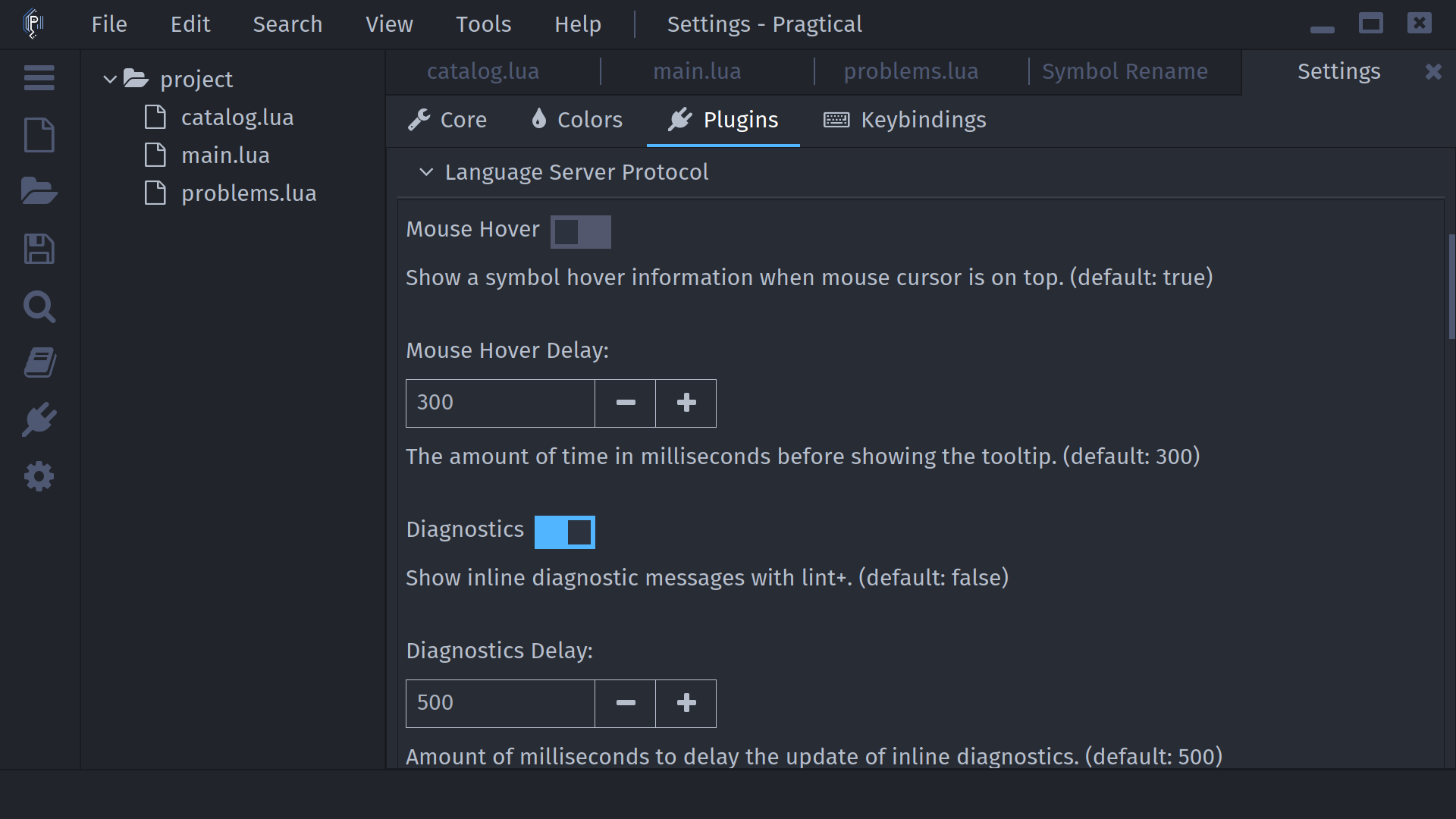
Completion and Hover
- User Module
- Settings UI
local config = require "core.config"
config.plugins.lsp = {
  mouse_hover = true,
  mouse_hover_delay = 300,
  snippets = true,
  apply_additional_edits = true
}
Set these before requiring plugins.lsp.config if you register servers in
the same user module.
Adjust Mouse Hover, Mouse Hover Delay, Snippets, and Apply Additional Completion Edits in the LSP section. Snippet integration may require a restart.
Hover delay is in milliseconds. Snippets need the corresponding integrations; enabling the preference alone does not install them. Result-list presentation also uses the bundled Autocomplete plugin's settings.
Diagnostics and Symbols
| Lua option | Runtime default | Settings label |
|---|---|---|
show_diagnostics | true | Diagnostics |
diagnostics_delay | 500 ms | Diagnostics Delay |
symbolstree_visibility | "auto" | Symbols Tree Visibility |
symbolstree_width | 300 * SCALE | Symbols Tree Width |
request_format_on_save | false | Request Document Format on Save |
The configuration specification lists Diagnostics as false while the runtime table initializes it to true. Set your preference explicitly; a saved Settings value can override the startup default.
Symbols Tree width is in screen pixels in Lua; the Settings control shows logical width and handles scaling. For example:
local config = require "core.config"
config.plugins.lsp = {
  show_diagnostics = true,
  diagnostics_delay = 500,
  symbolstree_visibility = "auto", -- "show" or "hide" are also accepted
  symbolstree_width = 260 * SCALE
}
See Diagnostics for the Lint+ integration and Formatting for the second-save behavior of asynchronous format-on-save.
Server Lifecycle
| Lua option | Default | Meaning |
|---|---|---|
autostart_server | true | Start applicable servers when files load. |
stop_unneeded_servers | true | Stop servers no longer needed by open files. |
server_quit_timeout | 60 | Idle timeout in seconds, unless a definition sets quit_timeout. |
checks_per_second | 25 | Frequency of checks for server data. |
more_yielding | false | Yield more while processing responses, trading throughput for responsiveness. |
Settings labels are Autostart Server, Stop Servers, Stop Servers Timeout, Checks Per Second, and More Yielding. Increasing the check frequency can consume more CPU. Tune these only when you have a specific response-time problem.
Use the start, stop, and restart commands from the Command Reference. A stop is not a permanent disable: loading another matching file can start a server again while autostart is enabled.
Logging
- User Module
- Settings UI
local config = require "core.config"
config.plugins.lsp = {
  log_server_stderr = true,
  log_file = "/tmp/pragtical-lsp.log",
  prettify_json = false
}
Choose a writable absolute log path for your operating system.
Enable Log Standard Error and, if protocol tracing is needed, choose Log File. Prettify JSON improves readability at a performance cost. Leave it off for ordinary use.
Per-server verbose = true enables detailed server logging.
The plugin's Force Verbosity Off preference (force_verbosity_off, default
false) overrides that value when registering servers.
Open the editor log with core:open-log.
Protocol logs can contain source text, filenames, and settings; review them
before sharing.
Troubleshooting
No Server Starts
Confirm that a server is installed and registered, the file has a saved
path, and its filename matches file_patterns. Verify that
autostart_server is enabled or use lsp:start-servers.
Installing a syntax highlighter is not the same as installing a language server.
The editor's PATH can differ from your terminal's, particularly when launched
from a desktop menu or after changing a Node/Python environment.
Use an absolute executable path if necessary and keep command arguments in
separate array elements.
A Server Exits or Cannot Initialize
Enable stderr logging, inspect the log, and try the command from the same
environment as the editor. Check executable permissions, runtime dependencies,
working directory, and server configuration.
On Windows, script commands may use cmd.exe /C, while native executables
are launched directly. Do not enable windows_skip_cmd for a script wrapper
unless its launch method actually supports that.
Completion Works but Another Feature Does Not
Check server capabilities, project configuration, and indexing status. Formatting, rename, implementation lookup, and code actions are independent features. Call Hierarchy's results interface is not implemented. Keep a supported document active for file-dependent commands.
Diagnostics Are Missing
Check whether the server published messages, then try
lsp:view-document-diagnostics. Inline rendering additionally requires Lint+
and the Diagnostics preference. The all-files picker only includes published
diagnostics; it does not force a workspace scan.
Snippets or Auto-Imports Do Not Work
Install Snippets and LSP Snippets, enable Snippets, and restart. For completion-generated imports/includes, enable Apply Additional Completion Edits. Both depend on what the server returns.
Project Configuration Seems Stale
Check the .pragtical_lsp.lua/.pragtical_lsp.json precedence described in
Workspace Settings.
Restart servers after changing startup options or project roots.
The client does not currently update workspace folders of running servers
when projects change.