Configuration and Troubleshooting
Open Settings > Plugins > Source Control Management to configure the
plugin, or set the corresponding values in your user module. The settings
namespace is spelled config.plugins.smc, not config.plugins.scm.
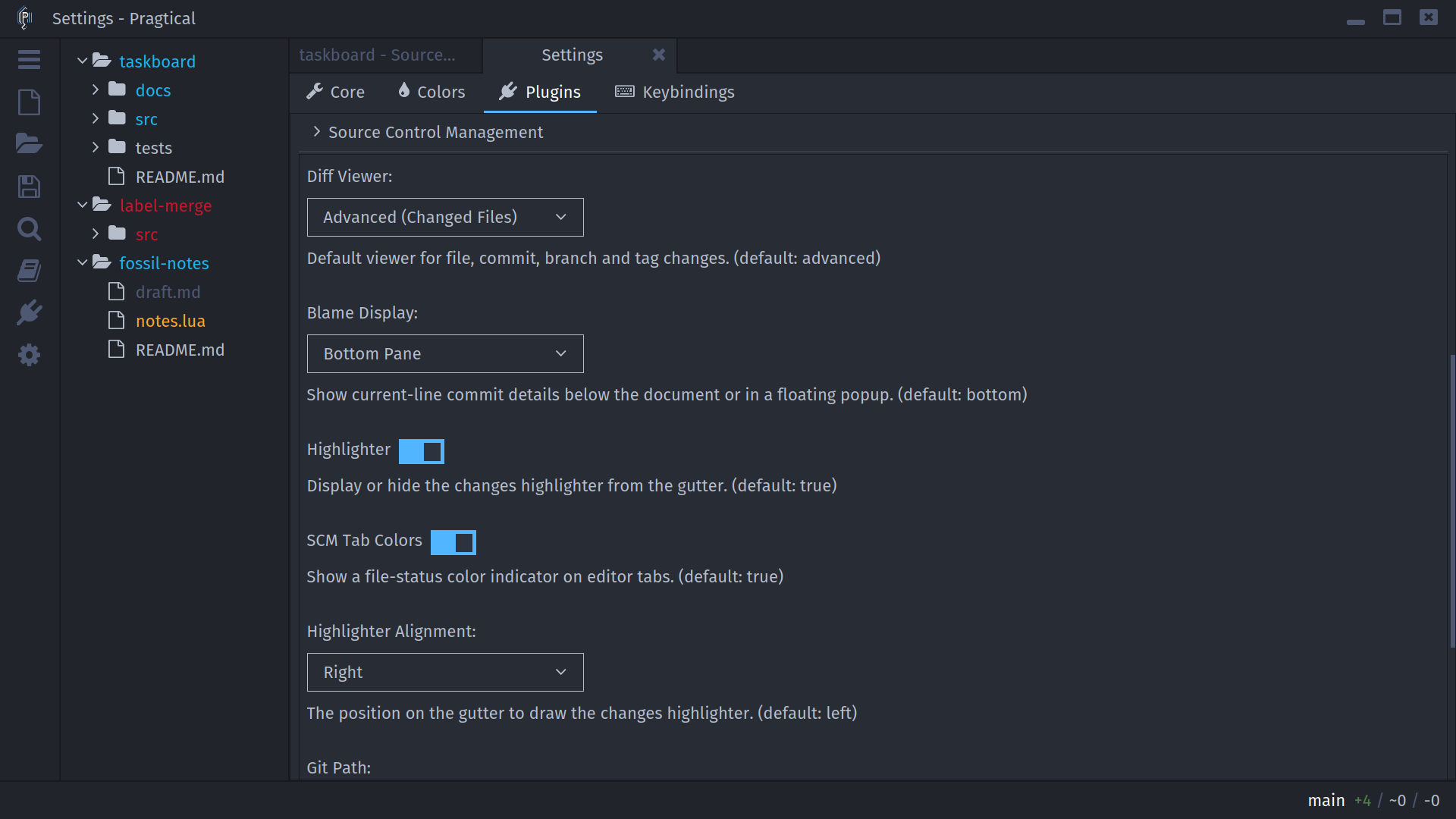
Diff Viewer
Advanced (Changed Files) is the default for project, path, commit, branch, and tag diff actions. Plain Text uses the original read-only patch view. Workbench inline previews remain part of the workbench regardless of this preference.
- User Module
- Settings UI
local config = require "core.config"

config.plugins.smc.diff_viewer = "advanced" -- or "text"
Set Diff Viewer to Advanced (Changed Files) or Plain Text under Plugins > Source Control Management. New diff actions use that choice; already-open comparisons are not replaced automatically.
The editor's built-in Diff Viewer settings are separate. They configure file/string comparisons, not SCM's patch-viewer selection.
Blame and Change Indicators
Blame Display chooses a bottom document pane or a floating popup. Blame starts disabled; enable it with ctrl+alt+b. Highlighter controls document gutter markers, Highlighter Alignment chooses their gutter side, and SCM Tab Colors controls file-status indicators on tabs.
- User Module
- Settings UI
local config = require "core.config"

config.plugins.smc.blame_display = "bottom" -- or "floating"
config.plugins.smc.highlighter = true
config.plugins.smc.highlighter_alignment = "right" -- or "left"
config.plugins.smc.tab_colors = true
Adjust Blame Display, Highlighter, Highlighter Alignment, and SCM Tab Colors in the SCM section. These are presentation preferences; turning an indicator off does not revert or untrack any file.
Git and Fossil Executables
The defaults are git and fossil. If the editor cannot find an executable,
set its absolute path. A desktop-launched editor can inherit a different
PATH from your terminal.
- User Module
- Settings UI
local config = require "core.config"

config.plugins.smc.git_path = "/usr/bin/git"
config.plugins.smc.fossil_path = "/usr/bin/fossil"
On Windows, use the executable's actual path, with forward slashes or escaped backslashes. Load user-module changes at startup. Settings UI path changes apply through the backend's command setter.
Choose the executable using Git Path or Fossil Path in the SCM section. These fields refer to the program, not to a repository directory or a Fossil database file.
Keyboard Shortcuts
See the Command Reference for the default shortcuts and command names. Use Settings > Keybindings or Pragtical's keymap configuration to change them. Commands with list-specific predicates require the corresponding SCM view to be active.
Troubleshooting
SCM Commands Are Missing
Confirm that the plugin is enabled, the relevant executable is available, and
the open project is a supported checkout. A bare Git repository is not an
editable working tree. For Fossil, open the checkout directory rather than
the .fossil database file.
Some commands require an active tracked document or a selected row. Features such as Git staging, rebase, worktrees, and LFS are not applicable to Fossil. Update the plugin and editor together if your installation predates controls shown in this manual.
Changes or Tree Colors Look Stale
Save the document, then use workbench Refresh or f5. External changes beneath collapsed folders may not trigger the editor's existing watchers immediately. Opening or refreshing an SCM view retrieves current repository state without installing whole-tree watches.
Unsaved buffer text and on-disk repository changes are different states. Repository commands inspect the saved files or index, while document gutter markers can reflect the open buffer.
There Is Nothing to Commit
For Git, stage the intended changes first. For Fossil, add untracked files before committing. The selected list row is not a per-file commit selection. An empty commit message, after stripping comments, is also rejected.
A Branch Has No Unique History or Diff
View Commits Not On Current Branch intentionally excludes ancestors of the current checkout. A fully merged branch can have an empty range while View Branch History still has entries. A Git branch's three-dot diff can also be empty when it contributes no change beyond the merge base.
For tag comparisons, check the documented comparison direction rather than assuming that the selected tag's own commit patch is being shown.
A Fetch Changed or Removed Tags
Git fetch includes tags and force-updates their local refs. Optional pruning can also remove tags absent from the selected remote. Conversely, deleting only a local tag does not delete it remotely, so fetching can restore it. See Fetch References.
Authentication Does Not Show a Prompt
Git needs an installed and configured credential manager, askpass helper, or SSH agent. SCM cannot display a terminal password prompt inside the editor. Fossil can request credentials through SCM's masked-password dialog after an authentication failure. See Authentication.
An Operation Failed
Read the error dialog and Pragtical log, including the repository and target named in the message. Distinguish authentication, missing refs, hook failures, and permissions from an actual conflict. If a Git operation is already in progress, follow Conflicts and Recovery before retrying unrelated operations.