Pragtical v3.15.0 Release
Pragtical v3.15.0 improves how the editor handles fonts, Unicode text and rendering, while making Settings easier to search and reset. It also adds workspace recovery checkpoints, more predictable line wrapping, richer clipboard support, and a native MSVC build for the Windows packages.
The changes below cover the work since v3.14.0.
Automatic Font Fallback And Unicode Editing
Missing characters should no longer require hunting down the right fallback font yourself. When your configured fonts cannot display a grapheme, Pragtical can now ask the operating system for an installed font that can. Your explicit font choices still take priority.
The implementation uses DirectWrite on Windows, CoreText on macOS and Fontconfig on Linux. Fontconfig is loaded at runtime, so Linux builds still work without it, but then missing characters need explicit fallback fonts. Other Unix-like systems with Fontconfig may work, but have not been tested.
The follow-up work fixes color and tag flags, rejects fonts that advertise a character but only draw a blank glyph, and falls back to individual components when an emoji sequence has no combined glyph. Failed lookups and glyph renders are cached too, so scrolling does not repeatedly try the same unsupported sequence. In a warm Linux emoji-scrolling test, the 95th-percentile frame time fell from about 113 ms to 5 ms; this is a specific workload, not a general performance guarantee.
Editing now follows the same grapheme boundaries as rendering. Moving the caret, deleting text and wrapping lines keep combining marks, variation selectors and composed emoji together rather than stopping inside a displayed character. Boundary caches are updated near an edit instead of rescanning the whole line.
Thanks to palant for requesting automatic font fallback. The font configuration guide and Color Emoji guide explain the available font priorities and fallback options.
Searchable Settings And Individual Resets
Core and Plugins settings now have search fields that stay visible while their sections scroll. Filtering keeps the existing controls instead of rebuilding the interface, so you can find an option without losing an edit.
Individual settings also have Reset actions. Reset removes the saved GUI override, restoring the default instead of writing another copy of it. Color settings can therefore follow the current theme again. The action disappears when there is no saved override left to remove.
The initial controls from PR #693 are shown below; the follow-up hides unused Reset actions.
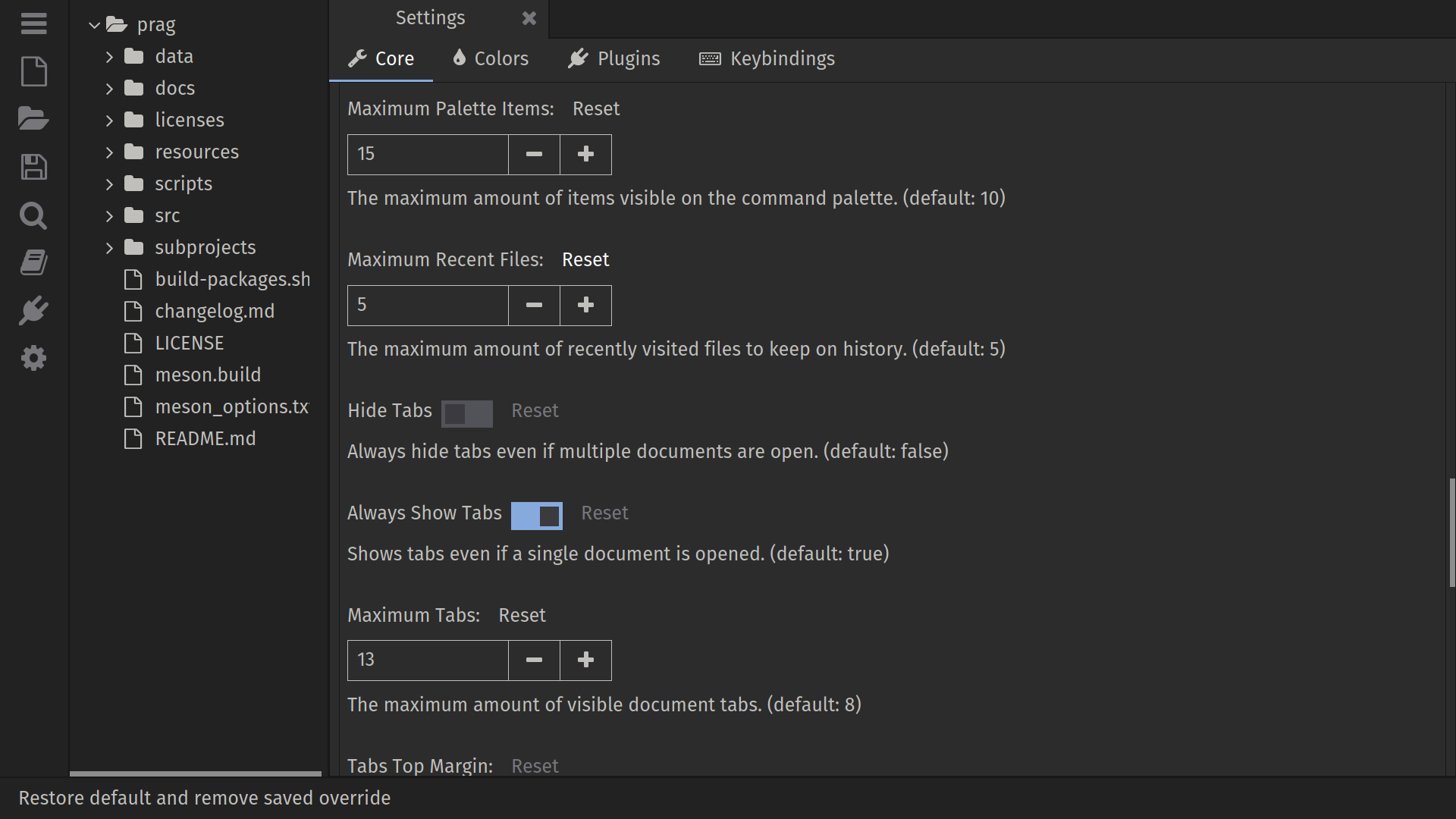
Here is the search and reset demonstration from PR #695:
Font selection has live previews while browsing the command prompt's results; cancelling restores the previous font. There is also an important fix for saved font settings that omit their options table: a misspelled fallback value could make the font fail to load and later overwrite the saved choice with the default. Thanks to AmerM137 for fixing that problem and the misleading hinting error.
Wrapping And Caret Placement
Soft wrapping now uses the shared Line Limit by default, or the viewport width when it is narrower. This makes wrapping line up with document centering and the column guide. Viewport-only wrapping is still available by disabling Settings > Plugins > Line Wrapping > Wrap At Line Limit.
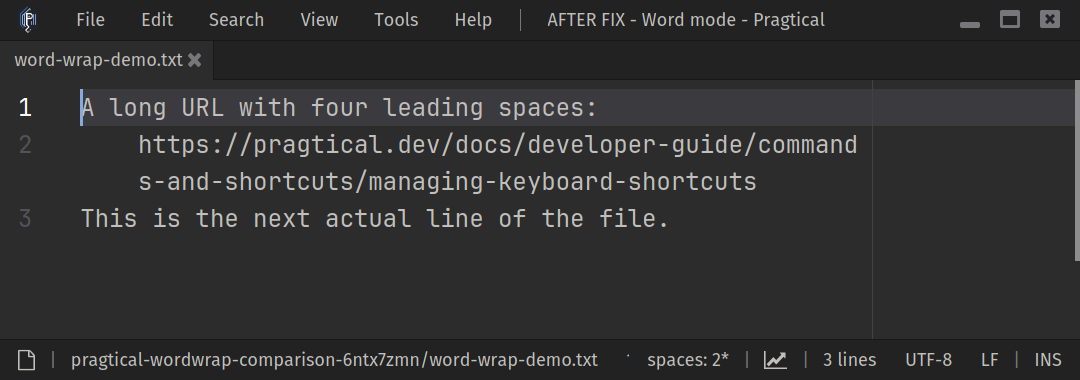
Word wrapping no longer treats leading indentation as a place to break before an oversized first word. Here is the corrected result from PR #671:
Mouse positioning also follows the visible wrapped rows and character boundaries, including the final column and documents with folded regions.
The new doc:center-cursor command scrolls the current caret into the vertical
center of its view. It follows the caret's wrapped row, not just the first row
of its document line. The default binding is Alt+V on Windows and Linux;
macOS leaves it unbound because Option+V produces a character there.
Thanks to AmerM137 for implementing the centering command, bananakid for the column-wrapping request, and ancient-dinosaurus for reporting the indentation break and last-column mouse positioning.
Less Idle Work And Faster Rendering
The work to reduce idle CPU usage continues. Views request updates for input,
animations or timed work instead of updating on every idle frame. The new
core.request_update(delay) API lets plugins schedule their next update, and
the scheduler preserves pending work through input events and exact frame
deadlines. This also fixes menus and other animations stopping halfway open
when the pointer stops moving.
In the focused-editor check shared with PR #652, CPU usage fell from 3.25% to 1.01% of one core with caret blinking enabled, and from 2.94% to 0.44% with it disabled. Results depend on the workload and enabled plugins.
The rendering cache now tracks smaller damaged regions and skips draw commands that cannot affect them. Large unchanged SDL GPU scenes can remain cached without sacrificing dense updates. In the Linux/X11 benchmark from PR #697, using 1,800 text draws at 1600x1000, the SDL GPU static-frame time fell from 1.361 ms to 0.184 ms and the caret-only case from 1.286 ms to 0.515 ms. Scrolling and fully changing frames stayed within trial variation, and before/after captures were pixel-identical.
SDL GPU pixel uploads also avoid an extra staging copy. Local 720p and 1080p pixel-streaming benchmarks measured about 20-23% less CPU time per frame for that upload path. Polygon fills now use the same FreeType edge coverage as the surface renderer, correcting self-intersecting shapes and oversized antialiased edges. Canvases queued for drawing remain alive until their frame finishes, even if LuaJIT's garbage collector runs first.
The native tokenizer reuses indexing and completed tokens across resumes and avoids repeated scans of the same line. A 1 MB CodeMirror line took 1.33 seconds instead of 69.93 seconds in one paired native-tokenizer comparison. Smaller C, Lua and Markdown tests were about 7-35 times faster than the Lua tokenizer; the PR #709 measurements include the individual inputs and baselines. These are tokenizer timings, not whole-editor speedups.
Plugin developers can find the scheduling conventions in the updates and rendering guide.
Workspace Recovery
Saved sessions now stay on disk while the editor is running. A crash or forced shutdown no longer removes the session that should be available on the next start. Sessions are stored per project, and the active session is remembered across restarts. Workspace directories are saved as absolute paths, with missing roots skipped and reported instead of breaking restoration.
There is also an optional Periodically Save Workspace setting under Settings > Plugins > Workspace. It saves temporary recovery checkpoints of open tabs and unsaved text, without saving the document files themselves. It is off by default; the default interval, when enabled, is 10 seconds.
local config = require "core.config"
config.plugins.workspace.autosave = true
config.plugins.workspace.autosave_interval = 10
Thanks to palant for reporting the lost-session behavior and suggesting periodic recovery saves.
Clipboard, Storage And Text Fixes
The clipboard API now supports MIME data, including
system.get_clipboard_mime_types(). On Linux, pasting files from a file manager
can fall back to text/uri-list and insert their paths when plain text is not
available. Native file-list formats on Windows and macOS still need separate
platform support; this does not make that fallback automatic on those systems.
Plugin storage can now target a project or an explicit directory as well as the user profile. Project-local files accept serialized data rather than executable Lua. See the persistent state guide for the new scope argument and usage examples.
There are fixes for multiline Markdown link highlighting, extra background padding around inline code in the preview, SVG files without an XML declaration, XHTML syntax detection, and whitespace markers just outside a selection. Thanks to palant for the reports and suggestions behind these clipboard and text improvements.
Borderless Windows And Interface Fixes
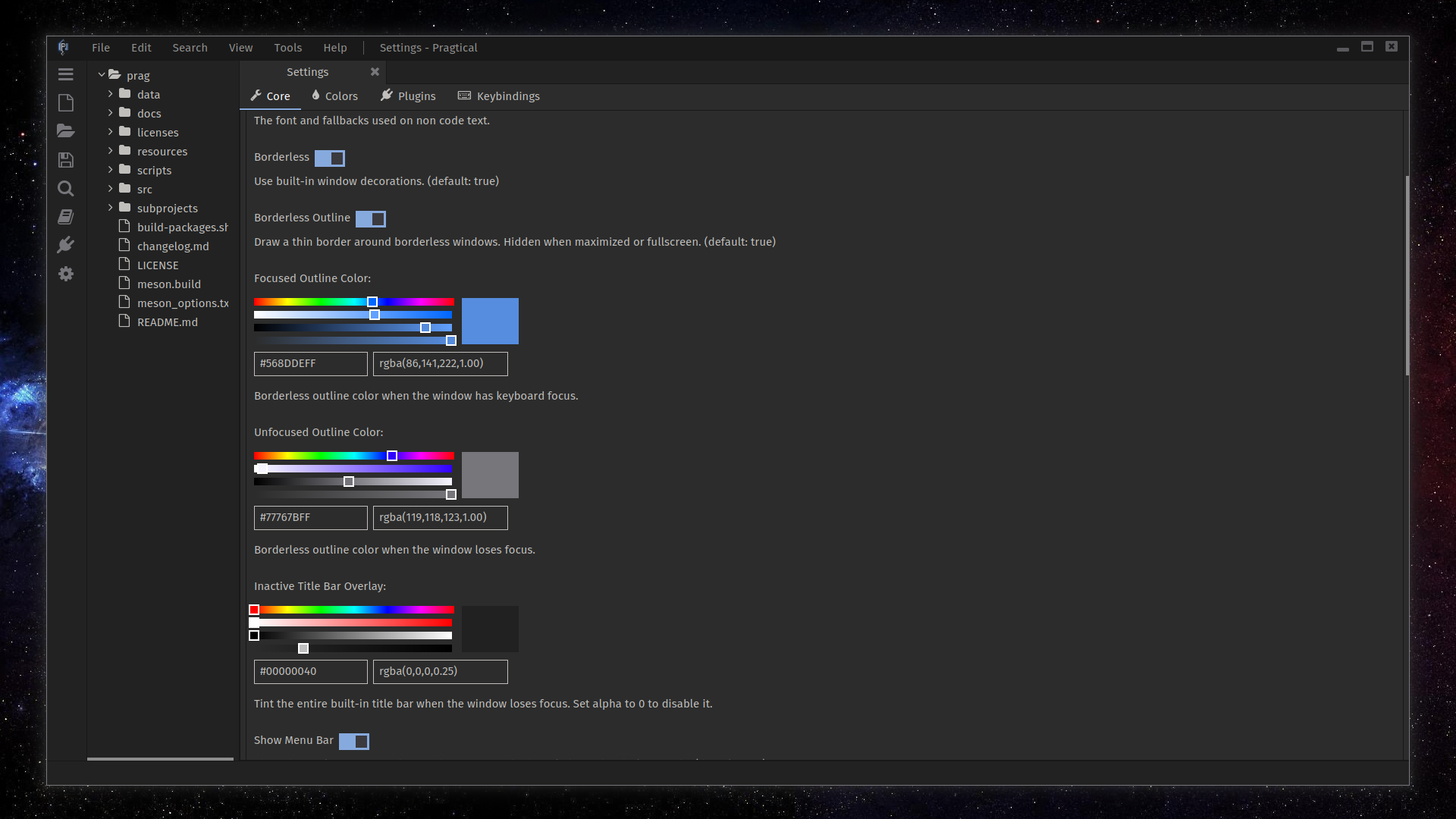
Borderless windows have configurable outlines and inactive title-bar tinting, making the window boundary and focus state easier to see. Windows also gets shadows with custom decorations. The title bar refreshes when focus returns.
Thanks to bananakid for the borderless-window usability suggestions. Menus and audio controls now use Fontello icons, including visible unchecked menu toggles. Thanks to Vinfall for reporting the menu alignment problem.
Nested dialogs stay above their modal owners and restore focus to the parent input when closing. SelectBox popups keep their bottom options visible when reopened after scrolling, including at fractional UI scales. Newly opened views, closed tabs and resized Widget controls request the redraws they need instead of waiting for another mouse or keyboard event.
The obsolete command-prompt file-count icon was removed too. Thanks to ancient-dinosaurus for pointing it out.
Windows Builds And Updated Plugins
Official Windows packages now use the native MSVC toolchain for tests, portable
archives and Inno Setup installers, retaining LTO and PGO for rolling and
release builds. The packages include pragtical.exe for the GUI and
pragtical.com for console commands. MSYS2/GCC remains a supported build route;
the build guide covers both.
Thanks to Omikorin for raising the MINGW64 deprecation issue that prompted this toolchain review.
SDL3 is updated to 3.4.20, with the Wayland clipboard ownership fix retained.
Plugin Manager 1.8.0 tracks installed versions and protects local plugin copies
during upgrades. AppImages include a PNG .DirIcon for newer packaging tools.
The plugins catalog includes the new optional web browser and libmpv-based media player, Ghostty updates, Erlang highlighting, and improvements to C3 and Rust highlighting. These optional tools are installed through Plugin Manager; they are not new built-in editor views.
Thanks to 0riginaln0 for the autocomplete minimum-length change, C3 updates, and transpose plugin. The completion minimum-length upper bound is removed, allowing larger configured values. Thanks also to Vinfall for the emoji keyword groups and Fortune fixes.
The website's user guide and API reference have been refreshed alongside the screenshots. There is also a new testing guide for writing and running tests against the editor runtime.
Thanks to everybody who reported issues, tried the rolling builds and helped test these changes!
Downloads on GitHub.
Changes Log
New Features
-
Add automatic system font fallback for missing graphemes (#712)
-
Add searchable Settings and per-setting reset controls (#693, #695)
-
Keep workspace sessions on disk and add optional recovery autosave (#718)
-
Add clipboard MIME data APIs and file-path paste fallback on Linux (#684)
-
Add project-scoped persistent storage with data-only loading (#680)
Enhancements
-
Use graphemes for caret movement, deletion and wrapping (#714)
-
Reduce idle view updates and add scheduled update requests (#652)
-
Optimize rendering cache damage tracking and command replay (#697)
-
Optimize native tokenizer state reuse and pattern matching (#709)
-
Reduce SDL GPU pixel upload copies (#713)
-
Preview fonts while browsing command prompt suggestions (#674)
-
Wrap at the configured column limit, with viewport wrapping still available (#699)
-
Add the doc:center-cursor command (#688)
-
Improve borderless window outlines, focus indication and Windows shadows (#691)
-
Use Fontello icons for menus and audio controls (#678)
-
Allow larger autocomplete minimum lengths (#648)
-
Refine project storage validation and remove its file-size limit (7b607c16, ac2c487c)
Fixes
-
Fix SDL GPU polygon fills and antialiased edge coverage (#650)
-
Preserve startup defaults when no video display is available (#654)
-
Redraw views and widgets after their first update (#655, #685)
-
Save absolute workspace directory paths and skip missing roots (#657)
-
Keep canvases alive until frame completion (#658)
-
Redraw after asynchronous node view closures (#659)
-
Fix Lua tokenizer loops when nested syntax closes at line end (#663)
-
Provide an operator fallback for character.special syntax colors (#665)
-
Respect exclusive selection ends when drawing whitespace (#668)
-
Detect SVG and XHTML syntax by filename extension (#669)
-
Keep word-wrap indentation attached to its first word (#671)
-
Fix nested dialog ownership, stacking and focus restoration (#673)
-
Initialize accepted TCP connection state and return nil without a client (#677)
-
Fix native resource leaks and buffer overflows (#686)
-
Preserve saved fonts when options are omitted and improve hinting errors (#689)
-
Keep nested Widget controls redrawing through layout changes (#700)
-
Highlight Markdown link labels that span multiple lines (#706)
-
Remove excess Markdown inline code background padding (#707)
-
Fix wrapped-line mouse positioning and final-column selection (#708)
-
Render color and tag flags correctly and avoid repeated failed font lookups (#715)
-
Keep SelectBox options visible when reopening scrolled popups (#716)
-
Run scheduled updates at exact frame deadlines (#719)
-
Preserve pending animation updates after input without a redraw (#720)
-
Clarify clipboard video MIME validation (e3027d3c)
Build System
-
Build official Windows packages with MSVC, including LTO and PGO (#701)
-
Update SDL3 to v3.4.20 and retain the Wayland clipboard ownership fix (#698)
-
Update Plugin Manager to v1.8.0 with installed-version tracking (#653, #667, #687)
-
Update bundled language plugins and the plugin catalog (#666, 0e39bd9c)
-
Include a PNG .DirIcon in AppImages (#664)
-
Avoid listener port reuse in loopback tests (#679)